
Tutorial Series
Ongoing (Q4 '24): 5-part Generative AI Series
Create RAG systems and AI agents with Sectors Financial API, LangChain and state-of-the-art LLM models -- capable of producing fact-based financial analysis and financial-specific reasoning. Continually updated to keep up with the latest major versions of the tools and libraries used in the series.
Create RAG systems and AI agents with Sectors Financial API, LangChain and state-of-the-art LLM models -- capable of producing fact-based financial analysis and financial-specific reasoning. Continually updated to keep up with the latest major versions of the tools and libraries used in the series.
Generative AI Series: Table of Contents
Table of Content
Table of Content
Generative AI for Finance
An overview of designing Generative AI systems for the finance industry and the motivation for retrieval-augmented generation (RAG) systems.
Tool-Use Retrieval Augmented Generation (RAG)
Practical guide to building RAG systems leveraging on information retrieval tools (known as "tool-use" or "function-calling" in LLM)
Multi-Agent Workflows
Building robust financial research systems with specialized agents using sequential chains and judge-critic patterns for improved reliability.
Structured Output from AIs
From using Generative AI to extract from unstructured data or perform actions like database queries, API calls, JSON parsing and more, we need schema and structure in the AI's output.
Tool-use ReAct Agents w/ Streaming
Updated for LangChain v0.3.2, we explore streaming, LCEL expressions and ReAct agents following the most up-to-date practices for creating conversational AI agents.
Conversational Memory AI Agents
Updated for LangChain v0.2.3, we dive into Creating AI Agents with Conversational Memory
Overview
In the previous chapter on Tool Use, we built a RAG system where a single AI agent learned to intelligently select and call multiple tools to answer financial queries. We saw how powerful this approach is—our agent could retrieve company data, analyze stock performance, and compare metrics all within one workflow. (If you’ve also explored our Agent Skills Guide, you’ll recognize this pattern of giving agents access to Sectors Financial API tools.) But what happens when a task is too complex for a single agent to handle reliably? As queries become more complex or require multiple reasoning steps, even a well-designed single agent can struggle with reliability and accuracy. This is where multi-agent workflows come in. Instead of relying on one agent to juggle multiple responsibilities, we can decompose complex tasks into specialized sub-agents, each focused on doing one thing exceptionally well. Think of it as moving from a solo performer to an orchestra—each instrument (agent) plays its part, and together they create something more robust and reliable than any single performer could achieve alone. In this recipe, we’ll build on the tool-calling concepts from Chapter 2 and take them further by creating a Multi-Agent Workflow using the OpenAI Agents SDK and the Sectors API. We’ll design a robust IDX research assistant using two powerful agentic patterns:- Sequential Chain: Passing the output of one specialized agent (a screener) to another (a researcher).
- Judge and Critic: Using a third agent (an evaluator) to rigorously grade the output and demand revisions if it falls short.
Prerequisites
This recipe assumes you are familiar with generating an API key and completing a basic request. If you haven’t already, review these two recipes: You will need theopenai-agents package for this recipe:
Step 1: Define the Tools
First, we will wrap two Sectors API endpoints into Python tools: a flexible stock screener and a company overview retrieval tool.Step 2: Create the Agents
Instead of using one massive prompt, we create three distinct agents with narrow, specialized responsibilities. This vastly reduces hallucinations and improves accuracy.Step 3: Orchestrate the Workflow
Now we bring it all together. We run the Screener to get tickers and pass those to the Researcher. To ensure quality, we use afor loop to let the Evaluator critique the Researcher’s output. If the output fails, the Researcher is prompted to fix it dynamically.
Output
When you run the workflow with the query “Top 5 IDX banks by market cap”, here’s what you’ll see in the console:1. Screener Agent Output
2. Researcher Agent - Initial Draft
get_company_overview for each ticker and compiles the data into a structured JSON format.
3. Evaluator Agent - Quality Check
If the draft passes:Step 4: Visualizing the Results
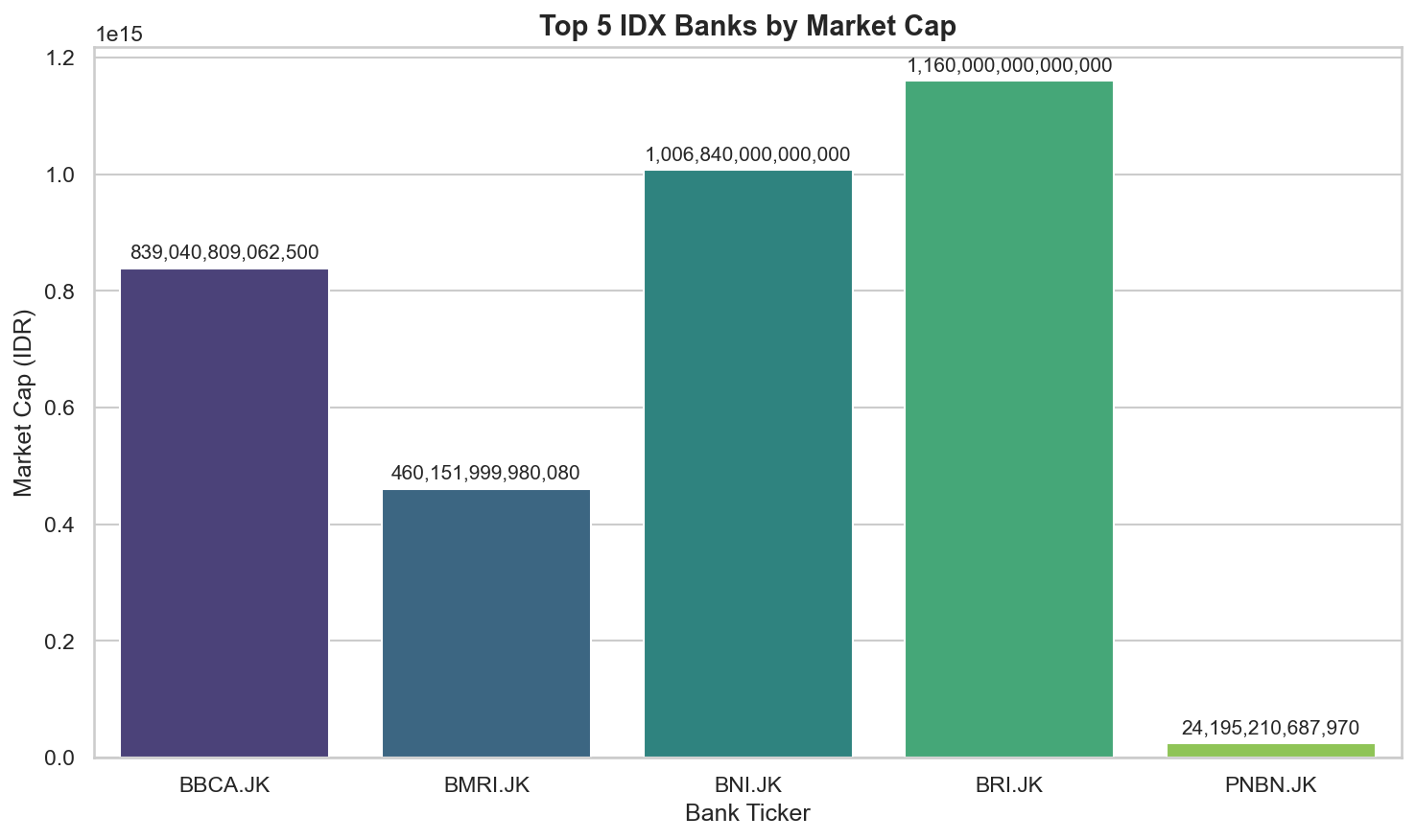
Once your multi-agent workflow produces structured JSON output, you can create visualizations for better insights using standard data science tools like pandas, matplotlib, and seaborn. Because our agents are designed to output clean, structured data, the transition from agent output to visualization is seamless—no manual data wrangling required.1. Install Visualization Dependencies
2. Create Visualization Helper Functions
3. Visualize Your Agent’s Output
After running your multi-agent workflow and obtainingfinal_output, run the codes below:
Summary
In this chapter, we advanced beyond single-agent RAG systems to build a robust multi-agent workflow that demonstrates two powerful agentic patterns:- Sequential Chain Pattern: We created specialized agents that work in sequence—a Screener agent retrieves relevant tickers, then passes them to a Researcher agent that gathers detailed company data. Each agent has a narrow, well-defined responsibility, reducing complexity and improving reliability.
- Judge-Critic Pattern: We implemented an Evaluator agent that rigorously validates the Researcher’s output against strict quality criteria. If issues are detected, the evaluator provides specific feedback and the researcher revises its output—implementing a self-improving loop that dramatically increases output quality.
- Visualized with pandas, matplotlib, and seaborn for exploratory analysis
- Stored in databases for historical tracking
- Fed into dashboards for real-time monitoring
- Used as input for other AI systems or business logic